A private home for your watch collection.

Keep your watch details, wear history and service records together. On your phone.

No account. No sign-in.

Explore the appOur approach to privacy

Coming soon to the App Store

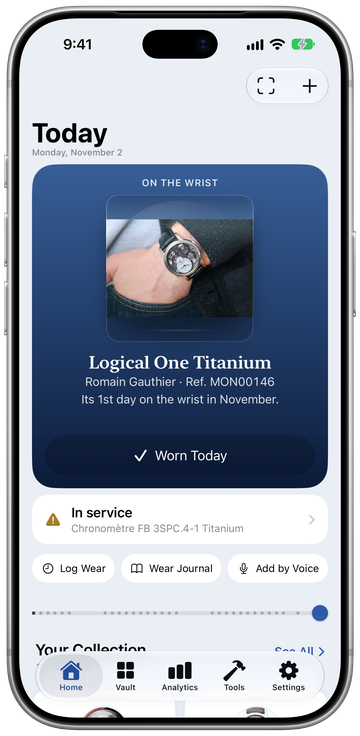
Home in Horology Vault. Prelaunch app preview with sample collection data.
HomePrelaunch app preview · sample collection data

01 / Collect

Vault01 / 06

Browse your collection.

Every watch has its own page in the Vault.
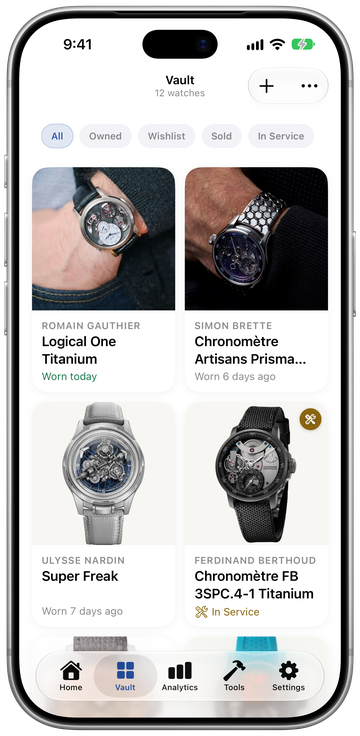
Vault in Horology Vault. Prelaunch app preview with sample collection data.
VaultPrelaunch app preview · sample collection data
Explore details

01 / Collect

Add Watches02 / 06

Add a watch your way.

Type or say its details, or scan an invoice or warranty card.
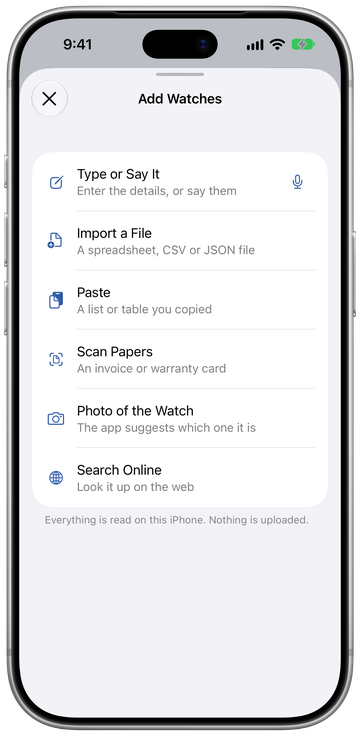
Add Watches in Horology Vault. Prelaunch app preview with sample collection data.
Add WatchesPrelaunch app preview · sample collection data
Explore details

02 / Wear

Log Wear03 / 06

What’s on your wrist?

Tap the watch you’re wearing, or say its name with Log by Voice.

Once a watch has a clear, dial-forward photo, Scan to Log can find it with the camera.
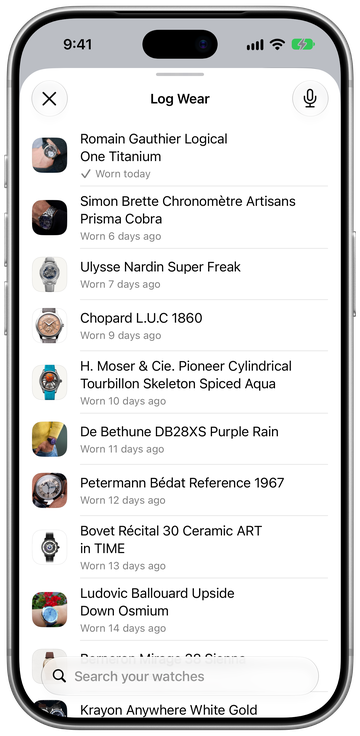
Log Wear in Horology Vault. Prelaunch app preview with sample collection data.
Log WearPrelaunch app preview · sample collection data
Explore details

02 / Wear

Wear Journal04 / 06

Look back at what you wore.

Revisit the days you’ve logged in Wear Journal, from a single week to a whole year.
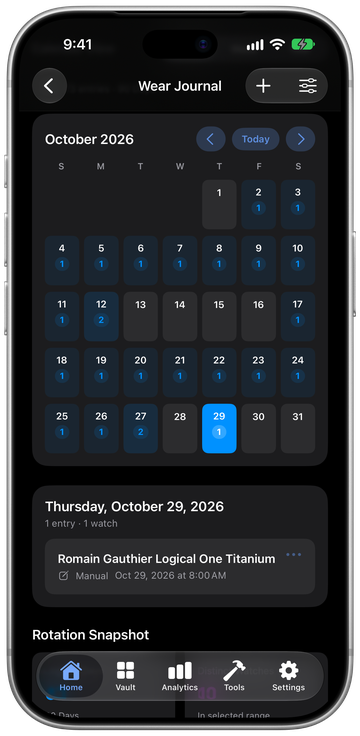
Wear Journal in Horology Vault. Prelaunch app preview with sample collection data.
Wear JournalPrelaunch app preview · sample collection data
Explore details

03 / Keep

Collection DNA05 / 06

See patterns in your collection.

Collection DNA draws on what you’ve recorded to reveal patterns across your watches.

About these signals

Collection DNA shows recorded evidence signals. These are not valuations, rankings or certified conclusions.

03 / Keep

Service & Care06 / 06

Care for the watches you keep.

Keep a record of each service. Service & Care shows which reminders are due.
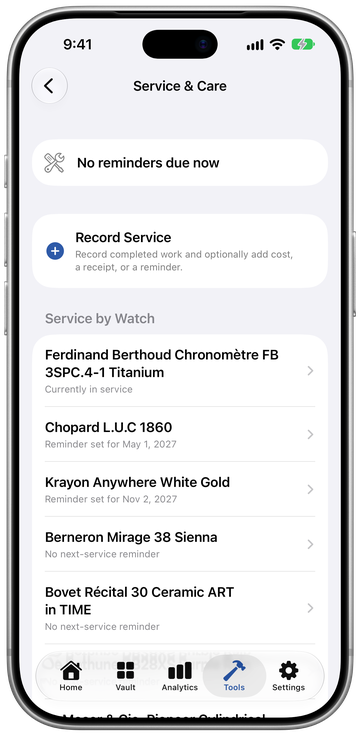
Service & Care in Horology Vault. Prelaunch app preview with sample collection data.
Service & CarePrelaunch app preview · sample collection data
Explore details
A closer lookBrowse the screens.

App screens

Swipe or choose a screen

HomePrelaunch app preview · sample collection data
Home in Horology Vault. Prelaunch app preview with sample collection data.

Home

Add WatchesPrelaunch app preview · sample collection data
Add Watches in Horology Vault. Prelaunch app preview with sample collection data.
Back to the story

Add Watches

Type or say its details, or scan an invoice or warranty card.

Log WearPrelaunch app preview · sample collection data
Log Wear in Horology Vault. Prelaunch app preview with sample collection data.
Back to the story

Log Wear

Screen detailLog Wear
Wear JournalPrelaunch app preview · sample collection data
Wear Journal in Horology Vault. Prelaunch app preview with sample collection data.
Back to the story

Wear Journal

Screen detailDay by day
VaultPrelaunch app preview · sample collection data
Vault in Horology Vault. Prelaunch app preview with sample collection data.
Back to the story

Vault

Screen detailA watch’s page
Service & CarePrelaunch app preview · sample collection data
Service & Care in Horology Vault. Prelaunch app preview with sample collection data.
Back to the story

Service & Care

Screen detailDue reminders

A few more things to explore.

Wanted Watches

A list for the watches you’re considering.

Watch Expert

Ask questions about your collection. Local AI answers on your phone; optional cloud providers use your own key.

Local AI is the default and needs an iPhone with Apple Intelligence. The rest of the vault works without it.

Siri & Shortcuts

“Add watches to Horology Vault”

“Scan to log a watch in Horology Vault”

Watch names, values and photos are hidden in widgets, Siri and Spotlight by default.

Privacy

Your collection is personal.

Your collection data and watch photos are protected when your phone is locked.

No advertising, usage analytics or tracking.

Protect the app with Face ID or your passcode.

Speech, scanned papers and watch recognition are processed on your phone. Optional cloud AI sends requests directly to your chosen provider only with your permission.

Back up when you choose.

Encrypted iCloud Drive backup stays off until you turn it on.

Keep your recovery key: Horology Vault cannot recover it.

Keep exchange rates up to date.

Automatic exchange-rate updates stay off until you allow them. Those requests carry no collection data.

You review support messages and send them from your own email app.

Read the privacy policy

Anything you’d like to know?

Coming soon to the App Store

Browse the screensGet in touch
  • Designed for iPhone.
  • Requires iOS 27 or later.
  • In English.

Right now.

Enable JavaScript to see the current time.

View screen